 TimeMark
Tap. Time. Label. Export.
TimeMark is an event recorder for live observation. Set up a board of labelled buttons, tap them as things happen, and walk away with a clean timeline timed to the hundredth of a second. Then fix the mis-taps and export it.
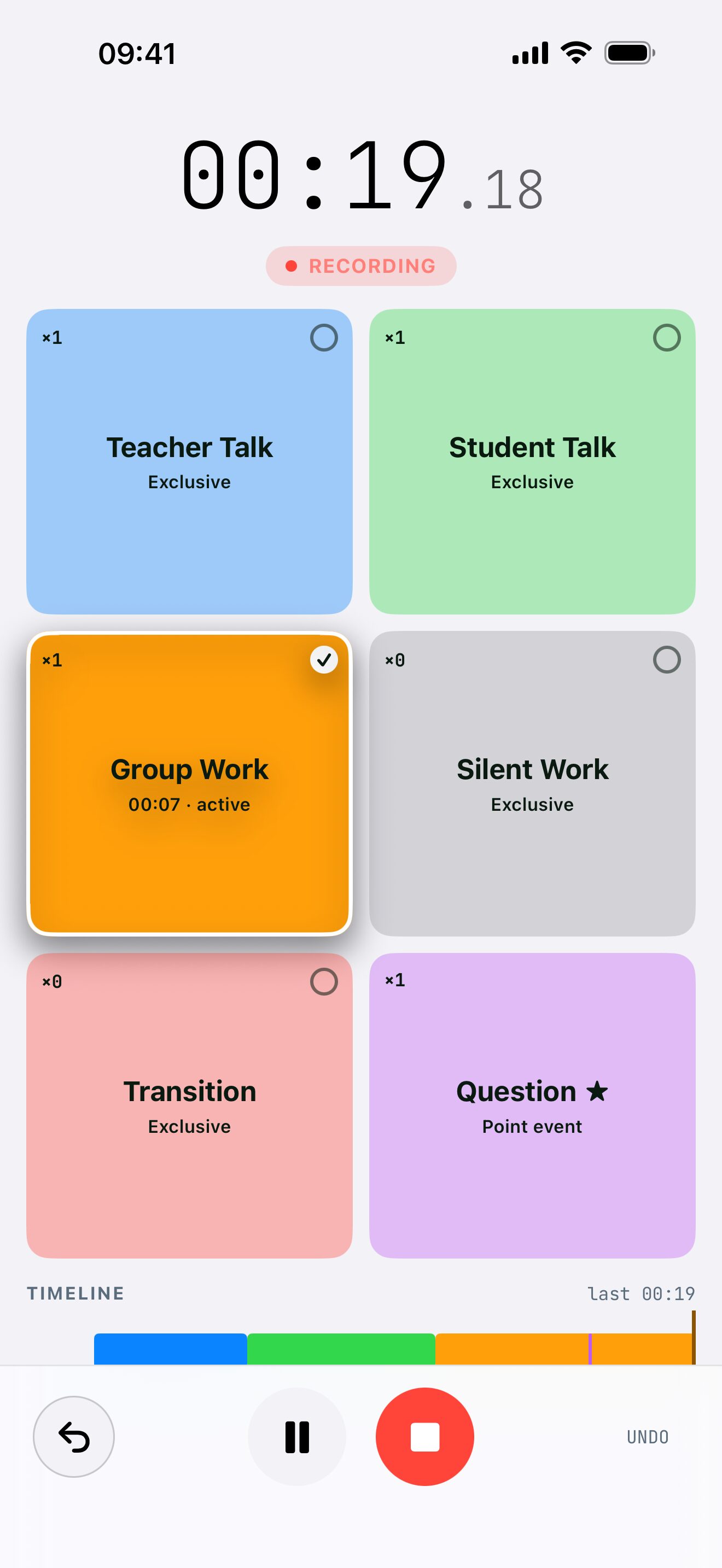
Record a session. Right here.
This is TimeMark's recording screen running in your browser, with the UX Session template. Tap as if you were watching someone use an app, then stop to see the timeline and download the CSV.
- Tap Browsing to start the clock.
- Tap Confused. Browsing ends by itself: states are exclusive.
- Tap Speaking while they're confused. It overlaps, so Confused keeps going.
- Mis-tap? The undo button takes back your last tap.
- Stop to see your swim-lane timeline and export it.
On a keyboard, keys 1 to 6 tap the buttons.
Built for the moment you can't look away.
When you're watching a lesson, a match, a user test or an animal, you don't have time to type. TimeMark is one big tap target per thing you care about, and a timer that never loses track.
Pick a board
Start from one of ten built-in templates, from classroom observation to match analysis, or build your own buttons.
Tap as it happens
Every tap is timestamped to the hundredth of a second, with a haptic tick so you never need to look down. Undo the last tap if you slip.
Review and export
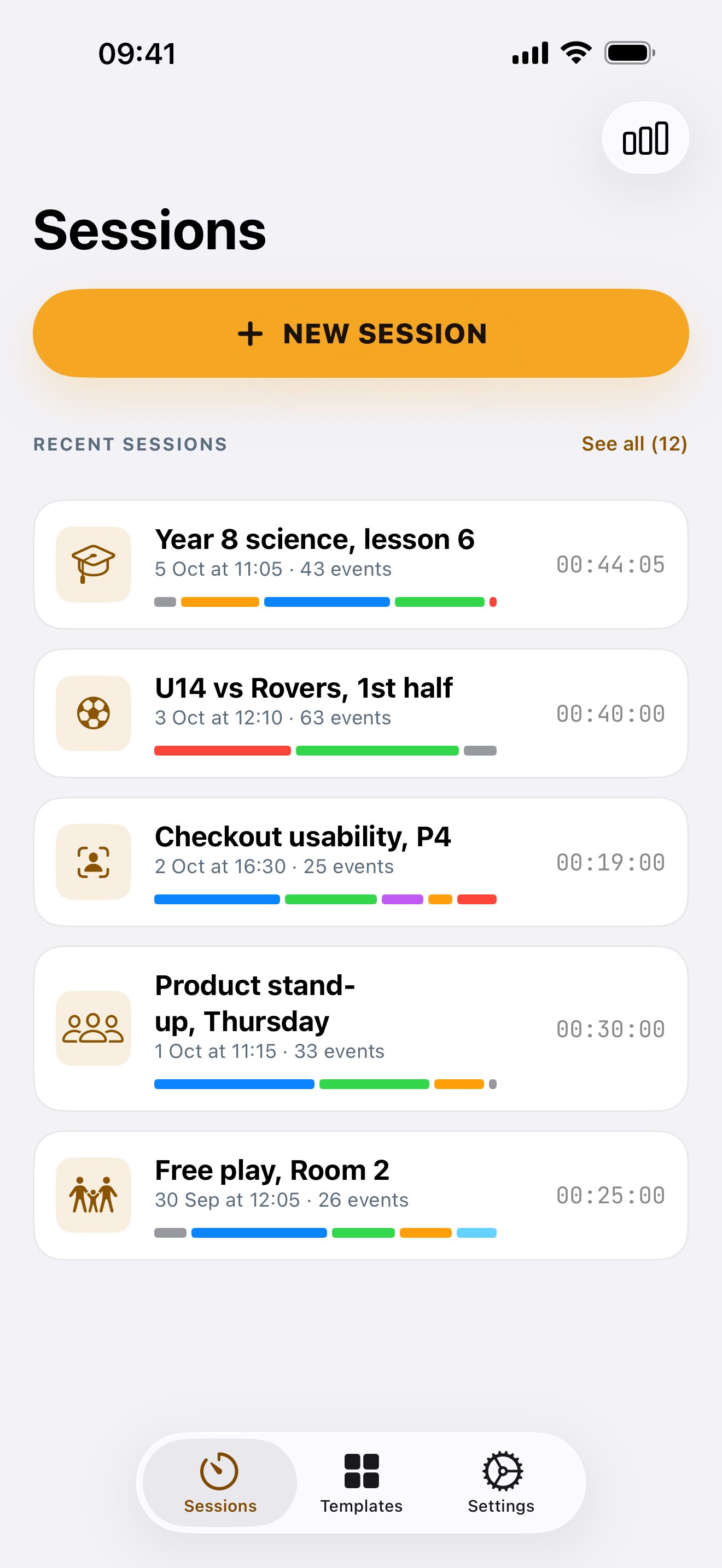
Stop and you get a swim-lane timeline with totals per label. Fix anything, then export CSV, JSON or a shareable image.
From first tap to finished timeline.
Nothing between you and the thing you're watching, and everything you need afterwards.
Big buttons. Exact times.
The recording screen is built for use at arm's length, outdoors, without looking. Buttons fill the screen, show what's running and for how long, and never let one state quietly overlap another.
- Timestamps to the hundredth of a second
- Haptic feedback on every tap, and a one-tap undo
- Pause and resume, or run a timed session that stops itself
- The screen stays awake while you record
- Landscape layout, VoiceOver labels and on/off marks, not colour alone
A timeline you can actually read.
Every session becomes a swim-lane chart: one lane per label, bars where things happened, a summary of how much time went where. Add a note so you remember the conditions.
- Totals and percentages per label
- Edit after the fact: relabel, nudge start and end, split or delete
- Export CSV, JSON with ISO timestamps, or a timeline image
- Save straight to Files, iCloud Drive, AirDrop or Mail
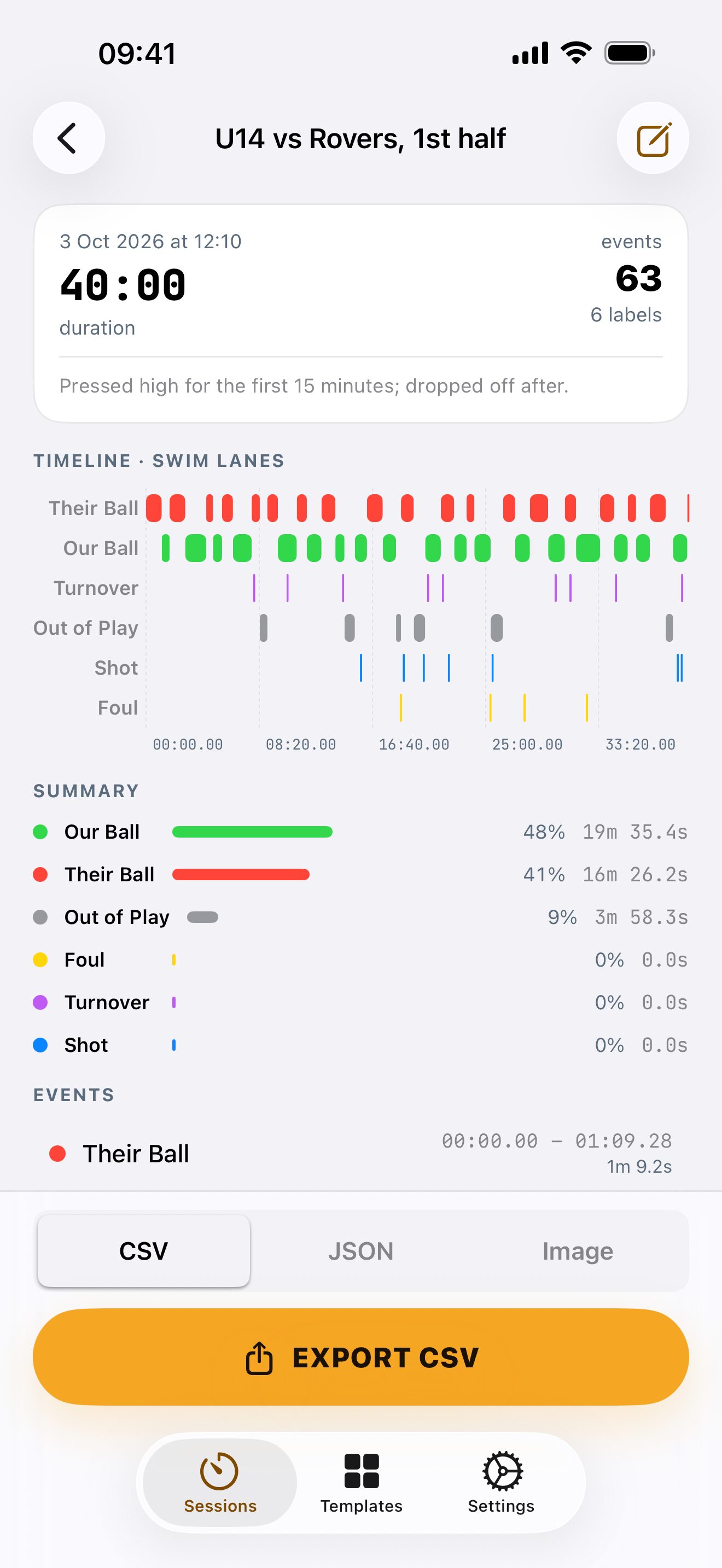
Start in seconds.
Ten ready-made templates cover the common setups. Build your own boards with as many buttons as you need, and share them with colleagues as a file so a whole team records the same way.
- UX session, classroom observation, animal behaviour, match analysis, meeting talk time, child play, sports drill, presentation practice, exercise session and riding gaits
- Name a session up front, or let TimeMark stamp the date and time
- "Again" repeats your last template with one tap
- Share and import templates as .json files
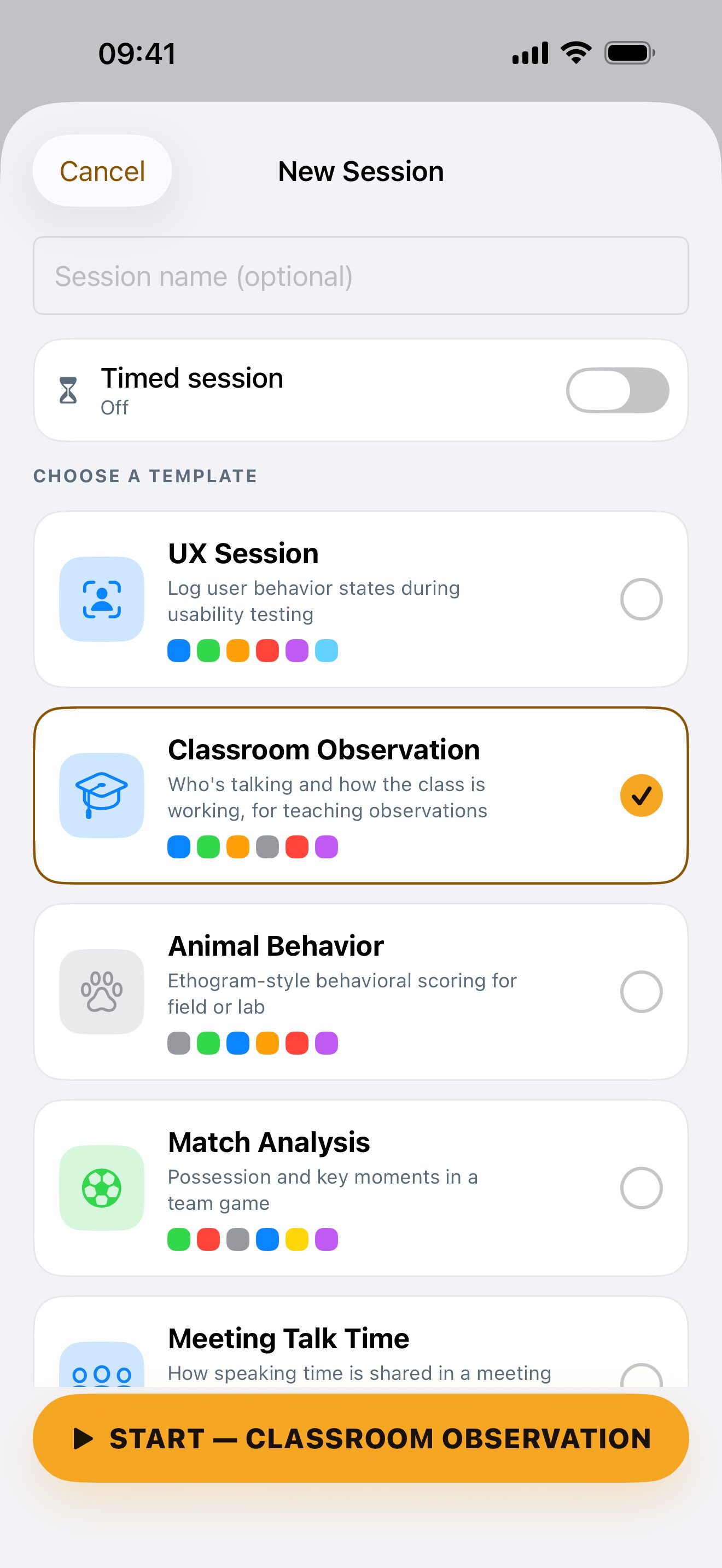
Every session, kept and searchable.
Your history lives on the home screen with a mini timeline for each session, so you can tell them apart at a glance. Search by name, note or label.
- Mini timeline and duration on every row
- Trends across all your sessions with Insights
- Recovers a session in progress if iOS closes the app
- Full backup and restore as a single JSON file
Each button knows how time works.
Mix them freely on one board. This is what lets a single tap on "Student Talk" end "Teacher Talk" for you, while "Question" marks an instant.
Exclusive
One at a time within its group. Starting one ends the last, like radio buttons. Perfect for states.
Overlap
Runs alongside anything else. Log speaking while browsing, or notes while a session runs.
Toggle
Tap on, tap off, independent of every other button. Good for sprints, fouls, anything with a duration.
Point
A single instant with no duration. For counting things: a whistle, a vocalisation, an error message.
Your observations stay on your device.
TimeMark has no account, no server and no analytics. Sessions live on your iPhone and only leave it when you export them, to wherever you choose.
- Stored locally Sessions, templates and settings are saved in the app's own storage on your device.
- No tracking, no ads, no third-party SDKs There is nothing to opt out of, because nothing is collected.
- Export in open formats CSV and JSON you can open anywhere, and a full backup you can restore on a new device.
- Works offline Recording, review and export never need a connection. Only buying Pro talks to the App Store.
Try every feature free for 3 days.
Start with a 3-day free trial of the yearly plan. Then keep TimeMark for good with a single payment, or carry on yearly or weekly if you only need it for a season.
Free trial
then $39.99 a year
- Every feature unlocked from the first tap
- Cancel anytime before it ends
- No charge if you cancel in time
- One trial per Apple ID
Lifetime
or $39.99 a year, or $5.99 a week
- Unlimited recording with every template
- Custom templates with unlimited buttons
- CSV, JSON and timeline image export
- Insights across all your sessions
Prices in USD. Your local price is shown in the app before you buy. The trial comes with the yearly plan: cancel at least 24 hours before it ends and you won't be charged. Lifetime never renews; yearly and weekly plans renew until you cancel.
Things people ask first.
Where are my sessions stored?
On your device only. TimeMark has no account and no cloud service of its own. Your sessions are included in your normal iPhone backup, and they leave the device only when you export them.
What's the difference between the button types?
Exclusive buttons act like radio buttons within their group: starting one ends the previous one, which suits states such as who's talking or game phases. Overlap buttons run alongside anything. Toggle buttons switch on and off independently. Point buttons log a single instant with no duration.
I tapped the wrong button. Can I fix it?
During recording, the undo button reverses your last tap. Afterwards, open the session and choose Edit events: you can relabel an event, nudge its start and end in tenth-of-a-second steps, split it in two, delete it, or add one you missed.
What do the exports look like?
CSV has one row per event with start, end, duration, label and group, and opens in Excel, Numbers or Google Sheets. JSON (Pro) adds ISO 8601 timestamps and session metadata for analysis in R or Python. The image export (Pro) is a PNG of the timeline, ready to share.
What happens if my phone locks or the app closes mid-session?
The timer keeps real time while the screen is locked, and pausing is explicit. If iOS closes the app during a recording, TimeMark saves what you had and offers to recover it the next time you open it.
How do I move my sessions to a new iPhone?
Settings, then Backup & data safety, then Export all sessions. Save the file somewhere the new device can reach (Files, iCloud Drive, AirDrop), then import it from the same screen there. Restoring an iPhone backup also brings your sessions across.
How do I restore TimeMark Pro?
Open Settings in the app and tap Restore purchases while signed in with the Apple ID you used to buy it. Lifetime is paid once and never renews. Yearly and weekly plans renew until you cancel them in your iPhone's Settings, under your name, then Subscriptions.
Stop scribbling on a clipboard.
TimeMark is coming soon to the App Store for iPhone. Try it free for 3 days, no account needed. Want a note when it's out?
Tell me when it launches