 SpendWise
Every dollar, accounted for.
Log an expense in three taps. Scan a receipt and let your iPhone read it. Drop in your bank's CSV. SpendWise shows you where your money actually goes, without an account, a cloud, or a single byte leaving your phone.
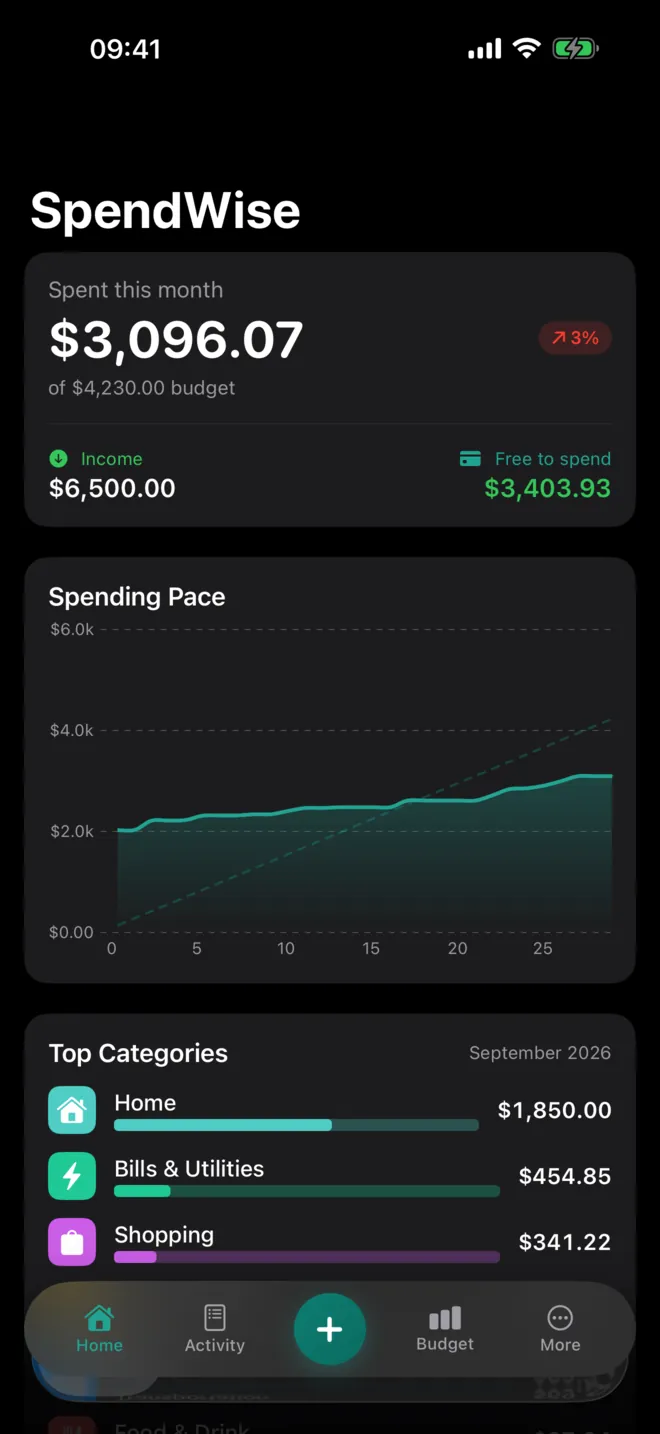
Five screens. That's the whole app.
No hidden tabs, no feature maze. A dashboard for the month, a clean list of what you spent, a fast way to add more, budgets that tell you the pace, and insights for the long view.


Capture. Budget. Understand.
A short, honest loop. No streaks to defend and no gamified guilt over a coffee. Just your numbers, kept tidy.
Log a purchase before the receipt hits the bag.
Tap +, type the amount, pick a category. The keyboard is already up and Save waits for you. SpendWise learns your merchants, so the right category is usually already chosen.
- Manual entry3 taps
- Receipt scanon-device OCR
- Bank importCSV · TSV · JSON · OFX
- Smart categorieslearns as you go
Budgets that show the pace, not a scolding.
Set a monthly limit per category and watch the bar move. Green while you're on track, amber at 70%, red at 90%. Life changed? Edit the number. There's no penalty for being human.
- Per-category limitslive progress
- Spending pacevs. ideal line
- Breakdown donutat a glance
- Home-screen widgetbudget left
See what's actually moving the needle.
Which months ran hot, which merchants took the biggest slice, which subscriptions quietly renew every month. No black-box "financial health score." Just your data, charted plainly.
- Six-month trendvalues on every bar
- Income vs. expensesside by side
- Top merchantsamount + count
- Recurring chargesmonthly total
Log as you go. Let the statement check your work.
Add purchases day to day. At the end of the month, import your bank statement and SpendWise lines the two up on your phone. What you logged gets a bank-confirmed seal, what you missed is one tap to add, and you get a score for how much you caught.
- Smart matchingtips, lag, bank shorthand
- Nothing counted twicelogged items confirmed
- Missed purchasesone tap to add
- Tracking accuracymonth over month

However your money moves, it gets in.
Type it
A big amount field, a category grid, done. Fast enough to use at the register.
Scan it
Point your camera at a receipt. Apple's Vision framework reads the merchant, total, and date on your phone.
Import it
Export from your bank, drop the file in. SpendWise maps the columns, then checks every line against what you already logged.
What leaves your phone? Nothing.
There is no SpendWise account and no SpendWise server. Your transactions live in your iPhone's local database, and the only copy outside it is the one you choose to export.
- No bank logins, everNo Plaid, no aggregators, no credentials. Imports use files you export yourself.
- Receipts read on-devicePhotos aren't uploaded or saved. Only the merchant, total, and date are kept.
- Nothing to opt out ofNo ads, no trackers, no third-party SDKs. Apple's privacy label: "Data Not Collected."
- Yours to takeExport everything as a spreadsheet-ready CSV whenever you like.
SpendWise
* * *
Free to start. Pro when you're ready.
The core loop is free for good. Pro removes the limits and adds bank import. Every Pro plan starts with a 3-day free trial.
Everything you need to start tracking. No time limit.
- Unlimited manual entries
- Up to 3 budgets
- 3 receipt scans a month
- Dashboard, insights & widgets
- CSV export
- Bank import & statement check
About $0.58 a week, billed once a year after your trial.
- Unlimited budgets
- Unlimited receipt scanning
- Bank import: CSV, TSV, JSON, OFX
- Statement check & tracking score
- Everything in Free
- All future Pro features
Maximum flexibility. Good for a month of cleaning up your finances.
- Unlimited budgets
- Unlimited receipt scanning
- Bank import: CSV, TSV, JSON, OFX
- Statement check & tracking score
- Everything in Free
Prices in USD; your local price is shown in the App Store before you subscribe. Payment is charged to your Apple ID when the trial ends. Subscriptions renew automatically unless cancelled at least 24 hours before the end of the current period. Manage or cancel anytime in iOS Settings → Apple ID → Subscriptions.
Does SpendWise connect to my bank?
No, and that's deliberate. There's no Plaid or aggregator and the app never asks for banking credentials. Download an export (CSV, TSV, JSON, or OFX/QFX) from your bank's website and drop it in. SpendWise detects the columns, remembers the mapping, and reuses it next time.
Can it check what I logged against my bank statement?
Yes, with Pro. Keep logging day to day, then import your statement at month end. SpendWise matches each bank line to what you entered, allowing for tips, the few days a card payment takes to post, and the shorthand banks print (like SQ *BLUE BTL). Matches are confirmed instead of added twice, missed purchases are one tap to add, and Insights shows what share you caught each month. Importing an overlapping statement never creates duplicates.
What's free and what's Pro?
Free: unlimited manual entries, up to 3 budgets, 3 receipt scans a month, the dashboard, insights, widgets, 25 currencies, and CSV export. Pro adds unlimited budgets, unlimited scanning, bank file import, and the statement check: $29.99/year or $2.99/week, each with a 3-day free trial.
How does the 3-day trial work?
Pick a plan and you get full Pro for 3 days at no charge. If you cancel in iOS Settings before the trial ends, you pay nothing. Otherwise the plan you chose begins automatically. The trial is available once per Apple ID.
Where is my data stored?
On your device, in SwiftData, Apple's local database. We don't run a server, so there's nothing to upload to. If iCloud Backup is on, iOS includes SpendWise in your encrypted device backup the same way it does for any app.
Does it work on iPad, Mac, or Apple Watch?
iPhone and iPad are both native, and iPad gets a two-column layout. Apple silicon Macs can run the iPhone version. A Watch companion is on the roadmap.
Does it work offline?
Completely. Entry, OCR, categorization, and CSV parsing all run on-device. The only network traffic is Apple's own App Store subscription handling.
How do I export or delete everything?
Settings → Export Data (CSV) writes a spreadsheet-ready file you can save or share. Settings → Reset All Data wipes every transaction and budget on the spot. Deleting the app removes everything it stored.

Start with one purchase. See the month take shape.
Log today's coffee. Set one budget by Friday. By the end of the month you'll know exactly where it all went. Free to start, no account needed.
Tell me when it launches